 Nuvi
NuviWhere your audio goes, and when it is deleted
A recording of a conversation is personal. This page follows one recording from the microphone to the summary, including the parts that leave your device.
The path of one recording
- Your deviceYou tap Record. The recording is saved on your iPhone, iPad or Apple Watch first.Kept until you delete it
- Temporary uploadThe audio goes over an encrypted connection to cloud storage in the EU, only so it can be transcribed.Deleted when the transcript is returned
- Our own AI serversSpeech and language models on servers the developer operates write the transcript and the summary. No third-party AI service.Transcript and summary not stored
- Back on your deviceThe transcript, summary and to-dos come back to your device and sync through your own private iCloud.We cannot read your iCloud
1. It is saved on your device first
When you tap Record, the audio is written to your iPhone, iPad or Apple Watch. A watch recording is handed to your iPhone directly and leaves the watch once the iPhone has it. If you are offline, the recording simply waits.
2. It is uploaded so it can be transcribed
Nuvi does not transcribe on the device. The audio is sent over an encrypted connection (TLS) to temporary cloud storage (Google Cloud Storage, in the EU). It is there for one reason: so the transcription servers can fetch it.
3. Models on our own servers do the work
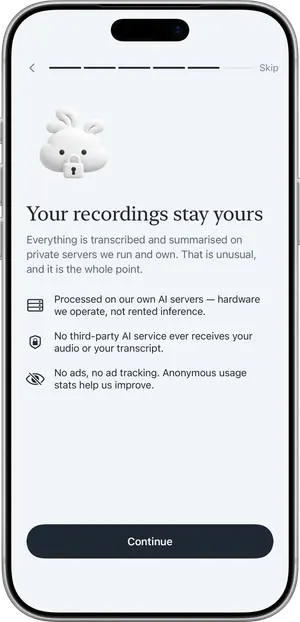
Speech and language models that run on servers the developer operates produce the transcript, separate the speakers and write the summary. The audio and the transcript are not sent to a third-party AI service.
4. The upload is deleted
As soon as the transcript has been returned, the uploaded audio is deleted. If something interrupts the job, a storage rule deletes whatever is left after one day. The transcript and the summary are returned to your device and are not stored on the server.
5. Your notes stay with you
The recording, transcript, summary and to-dos live on your device. If you use iCloud, they sync through your own private iCloud database, which the developer cannot read.
What is kept where
| Data | On your device and iCloud | On the servers |
|---|---|---|
| Recording (audio) | Kept until you delete it | Deleted when the transcript is returned; at most one day |
| Transcript and summary | Kept until you delete them | Not stored |
| Voiceprints | On the device only. Not in iCloud, not in backups | Never stored |
| Custom vocabulary | Kept | Sent as hints with a request; not kept |
| Role and company (optional) | Kept | Used to prepare suggested words; only the suggested word list is cached, under a one-way hash |
| Calendar events | Read on the device | Never sent |
| Anonymous identifier, minutes used, subscription status | - | Kept until you use "Delete all data" |
| Name, email, phone number | Never asked for | |
The honest parts
- Audio does leave your device. Transcription is not on-device. If that rules Nuvi out for you, it should.
- Other companies carry the data. Google provides the temporary storage and the backend functions, Cloudflare carries the encrypted connection to the AI servers, Apple provides iCloud and purchases, RevenueCat checks subscription status. None of them is an AI provider for your audio. They are listed in the Privacy Policy.
- There are anonymous statistics. The app counts which screens and features are used (TelemetryDeck) and crashes (Apple MetricKit). No transcript text, titles or names, and nothing linked to your identity.
- No compliance badges. Nuvi has no HIPAA, SOC 2 or similar certification and does not claim any.
- Other people are in your recordings. Recording someone may require their consent depending on where you are. Tell people before you record. See recording a meeting legally.
Deleting everything
"Delete all data" in Settings removes your notes from the device and your iCloud, and the records the servers hold under your anonymous identifier. How deletion works.
Questions about privacy
Is my audio stored on a server?
Only while it is being transcribed. The audio is uploaded over an encrypted connection to temporary cloud storage in the EU, sent to speech and language models on servers the developer operates, and deleted as soon as the transcript is returned. A storage rule deletes any leftover upload after one day.
Does Nuvi send my recordings to OpenAI or another AI company?
No. Transcription and summaries run on speech and language models hosted on servers the developer operates. The speech model is Whisper large-v3, which is open source and runs there; using it does not send audio to OpenAI. Audio and transcripts are not sent to a third-party AI service.
Is Nuvi transcription on-device?
No. Recording happens on the device, but transcription and summaries run on servers and need an internet connection. If your requirement is that audio never leaves the device, a tool that transcribes on the device is the better fit.
Are my recordings used to train AI?
No. Audio and transcripts are not used to train AI models. Transcripts and summaries are returned to your device and are not stored on the server.
Who can read my notes?
You. Notes are stored on your device and, if you use iCloud, in your own private iCloud database, which the developer cannot read. There is no web account where notes are kept.
Is Nuvi HIPAA or GDPR compliant?
Nuvi makes no compliance certification claims. This page and the Privacy Policy describe exactly how data is handled so you can judge it against your own obligations. If your rules require a signed agreement with the vendor or on-premises processing, Nuvi is not the right tool today.
Does the app track me?
There are no ads and no ad tracking. The app collects anonymous usage statistics through TelemetryDeck and crash counts through Apple MetricKit; neither is linked to your identity and neither contains transcript text, titles or names.
For questions to ask of any note taker, read AI note taker privacy: what happens to your audio.