 Nuvi
NuviNotes from the meeting you were actually in
Put the phone on the table, tap Record and take part. Afterwards you get a transcript split by speaker, a summary with decisions and a to-do list.
Nuvi, the AI note taker for iPhone, iPad and Apple Watch by Ege Beşe, records a meeting that happens in a room and turns it into a transcript split by speaker, a summary and a list of to-dos. It is made for the conversations a meeting bot cannot reach: the ones around a table.
The problem with notes from a meeting in a room
Someone has to write things down, and that person stops taking part. They look at a notebook while the conversation moves on, and what they capture is their own shorthand. A week later two people remember the same decision differently, and nobody is sure who agreed to send the draft by Friday.
Many AI note takers handle this by joining a video call. That does nothing for a stand-up by the whiteboard, a one-on-one over coffee or a workshop with sticky notes on the wall. Those meetings still end with whatever one person managed to type.
What you get from Nuvi afterwards
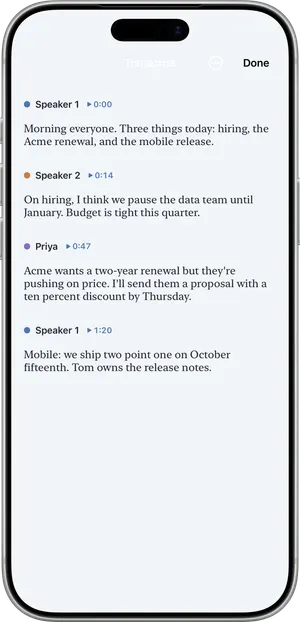
- A transcript split by speaker. Each voice is separated, and you can name the voices so the transcript reads like a conversation between people.
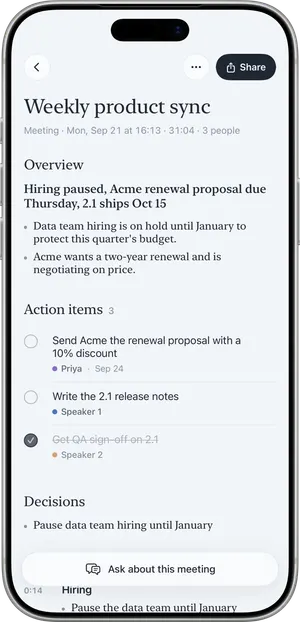
- A summary. An overview, key points and the decisions that were made, written in the language that was spoken.
- Action items. Each one carries an owner and a due date when those were said out loud. If nobody named an owner, Nuvi does not make one up.
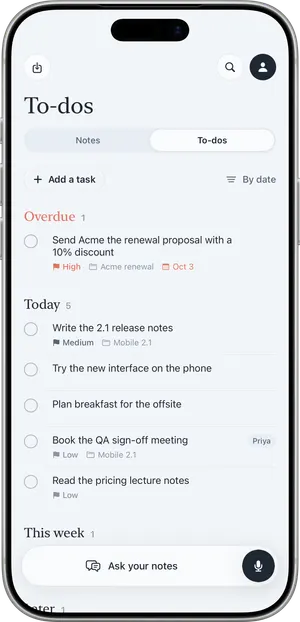
- To-dos. Action items land in a list sorted into Overdue, Today, This week and Later. You can add tasks by hand.
- Ask. Ask a question about the meeting and get an answer that cites the note it came from. With Pro you can ask across all your notes.
A weekly team meeting, step by step
Picture a four-person team meeting in a small conference room on a Monday morning.
- You say that you would like to record the meeting for notes, and everyone agrees.
- You open Nuvi, leave the microphone mode on Room so it hears every voice around the phone, and tap Record. The phone goes on the table.
- You lock the screen. Recording continues, and a Live Activity shows that it is still running.
- When the meeting is over you tap End. Nuvi shows its progress: Recorded, Uploaded, Transcribed, Writing summary.
- Nuvi asks “Which one is you?” and you pick your voice. You name a colleague and choose Save and remember voice, so that voice is recognized in next week’s meeting.
- You read the summary. It lists the decision to move the release by a week and three action items, two of them with an owner and a due date because those were said in the room.
- The transcript has a product name spelled wrong. You use Fix a word… once. Every place in that note is corrected, and later recordings are fixed automatically.
- You open To-dos, where your own action item sits under This week.
- On Thursday you open the note and use Ask to check what was agreed about the release date.
The same steps work for a one-on-one. A 10-minute stand-up fits inside the free plan’s per-recording limit, though 30 minutes a month go quickly.
What it does not do
- It does not join Zoom, Google Meet or Microsoft Teams calls. There is no meeting bot.
- It does not record phone calls.
- It has no team workspace, no shared folders and no Slack, Notion or CRM integrations. Notes are yours; you share a summary as text, or as a PDF with Pro.
- It does not transcribe on the device. Recording works offline and the app shows “Waiting for connection” until it can send the audio.
- A recording stops at one hour.
- The transcript is AI output. It can be wrong, incomplete or attribute words to the wrong speaker. Read the summary before you forward it.
Tell people before you record
Recording other people may require their consent depending on where you are. Tell everyone in the room before you tap Record, and do not record if someone objects. The article Is it legal to record a meeting? covers the general picture; it is information, not legal advice.
What it costs for meetings
The free plan transcribes the first 10 minutes of each recording, up to 30 minutes a month, with speaker separation, the summary and to-dos included. That suits an occasional short check-in. Nuvi Pro transcribes up to 60 minutes per recording with no monthly limit (fair use), and adds calendar capture, which offers a reminder two minutes before a meeting and titles the recording. US prices are $4.99 a week, $14.99 a month or $49.99 a year, with a free trial where available. Details are on the pricing page.
Related pages
- How to take meeting notes with AI
- An AI note taker without a bot
- Nuvi vs Otter, for when most of your meetings are video calls
- How Nuvi handles your audio
Recording other people may require their consent depending on where you are. Tell people before you record.
Questions
Can Nuvi take notes in an in-person meeting?
Yes. That is what it is made for. Nuvi records the room through the iPhone or iPad microphone, then returns a transcript split by speaker and a summary with key points, decisions and action items. Recording works without a connection, but transcription and the summary need the internet, so they arrive once the phone is back online.
Does Nuvi join Zoom, Google Meet or Microsoft Teams calls?
No. Nuvi has no meeting bot and does not join Zoom, Google Meet or Microsoft Teams calls. It also does not record phone calls. It records the sound around the device, so it fits meetings that happen in a room. If most of your meetings are video calls, a tool that joins the call will serve you better.
How long can a meeting recording be?
A recording can be up to one hour and stops automatically at one hour. For a longer workshop you start a new recording for the next part. On the free plan the first 10 minutes of each recording are transcribed, up to 30 minutes a month. Nuvi Pro transcribes up to 60 minutes per recording.
Does it know who said what?
The transcript separates speakers. After a meeting Nuvi may ask which voice is yours, and you can name the others and choose to save and remember a voice so it is recognized in later recordings, on the device. Speaker labels are AI output and can be wrong, so check anything that matters before you rely on it.
Do I have to tell people I am recording the meeting?
Tell them, every time. Recording other people may require their consent depending on where you are, and the rules differ from place to place. Saying so at the start of the meeting is also plain good manners. If someone objects, do not record. This is general information, not legal advice.
Tap Record. Read it later.
The transcript, the summary and the to-dos are part of the free plan.
