 Nuvi
NuviSay it out loud, find it written down
Record a thought on your iPhone or your wrist. Nuvi turns it into a Note with a transcript, a short summary and any to-dos you mentioned.
Nuvi, the AI note taker for iPhone, iPad and Apple Watch by Ege Beşe, turns a spoken thought into a Note: a transcript, a short summary and any to-dos you mentioned. You can start it from the Action button, the Lock Screen or your wrist.
The problem with voice memos
Ideas arrive on a walk, in a parking lot, halfway up the stairs. Speaking is the fastest way to catch one, so you record a memo. Then it joins forty other memos named after a street address, and you never listen to any of them again, because listening takes as long as recording did.
Typing has the opposite problem. By the time you have unlocked the phone, found the notes app and thumbed out the first sentence, the second half of the thought has gone.
What Nuvi does with a memo
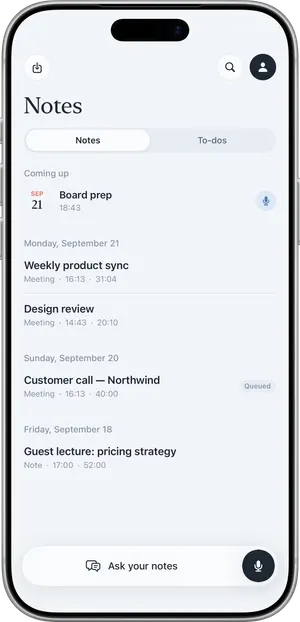
- One voice is a Note. Nuvi treats a recording with a single voice as a Note, and one with several voices as a Meeting.
- A transcript. What you said, as text you can read in seconds.
- A summary. An overview and key points, in the language you spoke. A five-minute ramble comes back as something you can scan.
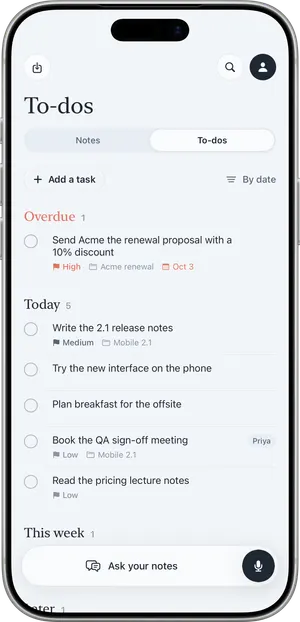
- To-dos. If you said “I need to email the landlord by Friday”, that can become an action item with its due date. Action items land in a list sorted into Overdue, Today, This week and Later, and you can add tasks by hand.
- Ask. Ask a question about a Note. With Pro you can ask across all your notes, and the answer cites the note it came from.
Ways to start without hunting for the app
- Action button, Siri and Shortcuts, through the “Start or Stop Recording” shortcut.
- A Control Center control.
- Lock Screen widgets and a Record widget on the Home Screen.
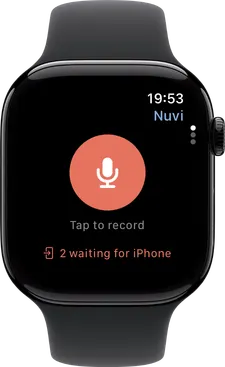
- Apple Watch. Tap to record on the wrist. The watch hands the file to the iPhone, which gets it transcribed.
Recording continues with the screen locked, and a Live Activity shows that it is running.
A walk, step by step
Picture a twenty-minute walk during which you work out the outline of a talk.
- Your phone is in your pocket. You press the Action button, which you have set to the Start or Stop Recording shortcut.
- You have chosen the Just me microphone mode. It reduces background noise and cleans up the voice closest to the phone, which helps on a street.
- You talk through the outline for six minutes. Halfway through you say that you need to book the room by Wednesday.
- You press the Action button again to stop. If you are in the app instead, you tap End.
- Nuvi shows Recorded, Uploaded, Transcribed, Writing summary, and the Note appears in your list.
- You read the summary: three sections for the talk, in the order you said them.
- You open To-dos. “Book the room” is there with Wednesday as its due date.
- A product name came out wrong, so you use Fix a word… once. It is fixed across that note and in later recordings.
- Another day you leave the phone at home and tap Record on the watch. Back in range, the recording shows as sent and the Note appears on the phone.
What it does not do
- No transcription on the device. Recording works offline, but the text needs an internet connection. The app shows “Waiting for connection” until then.
- The watch needs the iPhone. It records by itself, but it cannot get a transcript without the phone.
- “Just me” is for one voice. People across the room may come out faint. Switch to Room when someone else joins.
- No phone call recording.
- It can mishear. Transcripts are AI output and can be wrong or incomplete. A due date is captured only when you actually said one.
- No Mac, Windows, Android or web app. Notes sync between your own devices through your private iCloud.
- One hour per recording.
If someone else is in the recording
A memo to yourself involves nobody else. The moment another person’s voice is in it, the usual rule applies: recording other people may require their consent depending on where you are, so tell people before you record. See Is it legal to record a meeting?. It is general information, not legal advice.
What it costs for voice memos
Voice memos are the use the free plan fits best. It transcribes the first 10 minutes of each recording, up to 30 minutes a month, and includes the summary, to-dos, widgets and Apple Watch recording. If you talk through ideas every day you will reach 30 minutes; Nuvi Pro has no monthly limit (fair use). US prices are $4.99 a week, $14.99 a month or $49.99 a year, with a free trial where available. See pricing.
Related pages
Recording other people may require their consent depending on where you are. Tell people before you record.
Questions
Can I record a voice memo on Apple Watch and get a transcript?
Yes. The watch records on the wrist and hands the file to the iPhone, which gets it transcribed. The watch app shows whether a recording is still on the watch waiting for the iPhone or has been sent. The watch cannot produce a transcript by itself; it needs the iPhone and an internet connection.
Can I start a recording with the Action button?
Yes. Nuvi provides a Start or Stop Recording shortcut that works with the Action button, Siri and the Shortcuts app. There is also a Control Center control, a Record widget and Lock Screen widgets, so you can start a recording without opening the app and looking for the button.
What is the difference between a Note and a Meeting?
It depends on how many voices are in the recording. One voice is a Note, several voices is a Meeting. A voice memo you record alone becomes a Note with its own transcript and summary. If a second person joins the conversation, the recording is treated as a Meeting and the speakers are separated.
Does it work when I have no signal?
Recording works without a connection. The recording is saved on the device and is sent for transcription when the connection returns; until then the app shows that it is waiting for a connection. Transcription and summaries run on servers, not on the device, so the text arrives once you are back online.
How many voice memos can I transcribe for free?
The free plan transcribes the first 10 minutes of each recording, up to 30 minutes a month. Short memos of a minute or two fit well inside that. If the free minutes run out, the recording is still saved on the device. Nuvi Pro has no monthly limit, subject to fair use.
Tap Record. Read it later.
The transcript, the summary and the to-dos are part of the free plan.
