 Nuvi
NuviKeep your eyes on the person, not the notebook
Record an interview with consent and get a transcript split by speaker that you can question afterwards. Check every quote against the recording.
Nuvi, the AI note taker for iPhone, iPad and Apple Watch by Ege Beşe, records an in-person interview and returns a transcript with speakers separated, a summary and a way to ask questions about what was said. It gets you to the right passage quickly. Checking the exact words is still your job.
The problem with interview notes
An interview goes better when you listen. Every moment spent writing is a moment you are not watching the other person’s face or thinking of the follow-up question. So you record, and then the real cost arrives: typing out an hour of audio takes far longer than an hour, and it usually happens late, right before a deadline.
Researchers have a second problem. After ten user interviews, the useful pattern is spread across ten recordings. You remember that someone described the same workaround, but not who, or in which session.
What Nuvi gives you after the interview
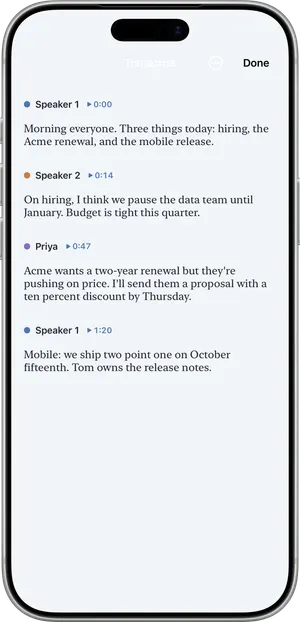
- A transcript split by speaker. Your questions and the answers are separated.
- Named voices. Name the interviewee, and choose to remember a voice you will record again. Remembered voices stay on the device.
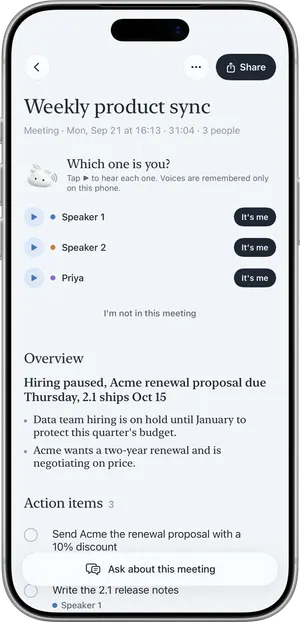
- A summary. An overview, key points, decisions and any action items, written in the language that was spoken.
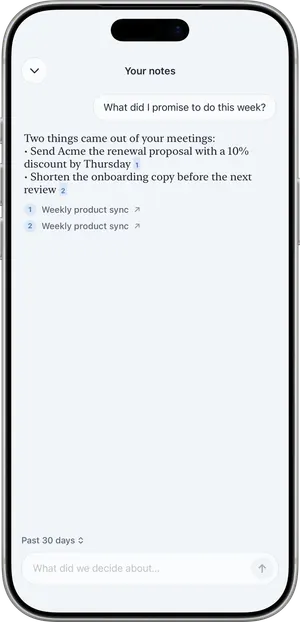
- Ask, with citations. Ask what the person said about a subject. The answer cites the note it came from. With Pro you can ask across all your notes, which is how you find that workaround in session six.
- Import. Bring in an existing audio file, or a video with sound, from Files (up to 60 minutes).
- Custom vocabulary. Add names, products and jargon before the interview so they are more likely to be heard correctly.
A user research interview, step by step
Picture a 40-minute conversation with a bakery owner about how she orders supplies.
- You explain that you would like to record for your notes and how the recording will be used. She agrees.
- You open Nuvi, set the microphone mode to Room so both voices are heard, and tap Record. The phone sits on the table between you.
- You lock the screen and run the interview. Recording continues, and a Live Activity shows it is running.
- At the end you tap End. Nuvi shows Recorded, Uploaded, Transcribed, Writing summary.
- Nuvi asks “Which one is you?” You pick your voice and name the other speaker.
- You read the summary for the shape of the conversation, then the transcript for detail.
- The name of her supplier is misheard. You use Fix a word… once, and every place in that note is corrected.
- You use Ask: “What did she say about ordering on weekends?” The answer points to this note.
- Before you put a sentence in quotation marks in your report, you listen to that passage in the recording and correct the wording.
For oral history or podcast prep the steps are the same. A recording stops at one hour, so a long sitting becomes two or more recordings.
What it does not do
- It is not a verified record. Transcripts can be wrong, incomplete or attribute words to the wrong speaker. Names and brand names said the local way are the most likely to be misheard. Do not publish a quote you have not checked against the recording.
- It does not record phone calls and does not join Zoom, Google Meet or Microsoft Teams calls.
- It does not transcribe on the device. Recording works without a connection; the transcript arrives when the device is online. If your source needs audio that never leaves your device, Nuvi is not the right tool.
- One hour per recording, and 60 minutes per imported file.
- No shared workspace. There are no team folders or shared projects. You share a summary as text, or as a PDF with Pro.
- No Mac, Windows, Android or web app.
Consent, and sources who need more
Recording other people may require their consent depending on where you are. Tell people before you record, say what the recording is for, and stop if they ask you to. See Is it legal to record a meeting? for the general picture; it is not legal advice.
If you work with sensitive sources, read how Nuvi handles audio before you decide. The audio is uploaded to be transcribed and is deleted as soon as the transcript has been returned.
What it costs for interviews
The free plan transcribes the first 10 minutes of each recording, up to 30 minutes a month, which is enough to judge the transcript on your own voice and subject. Most interviews need Nuvi Pro: up to 60 minutes per recording, no monthly limit (fair use), and Ask across all notes. US prices are $4.99 a week, $14.99 a month or $49.99 a year, with a free trial where available. See pricing.
Related pages
- Speaker diarization explained
- AI note takers and privacy
- Founders and solo operators, for customer interviews
Recording other people may require their consent depending on where you are. Tell people before you record.
Questions
Can Nuvi transcribe an interview with speaker labels?
Yes. The transcript separates speakers, and after the recording Nuvi may ask which voice is yours. You can name the other voice and choose to save and remember it, so it is recognized in later recordings, on the device. Speaker labels are AI output and can attribute words to the wrong person.
Can I quote directly from the transcript?
Not without checking. A transcript is AI output: it can be wrong, incomplete or give words to the wrong speaker. Use it to find the passage, then listen to that part of the recording and confirm the exact words before you publish or report a quote.
Can I import an interview I already recorded?
Yes. You can import an existing audio file, or a video with sound, from Files, up to 60 minutes long. Nuvi transcribes it and writes a summary in the same way as a recording made in the app. A longer file would need to be split before you import it.
Does Nuvi record phone or video call interviews?
No. Nuvi does not record phone calls and does not join Zoom, Google Meet or Microsoft Teams calls. It records the sound around the iPhone, iPad or Apple Watch, so it suits interviews held in person. A call recorded with another tool can be imported as a file if you have one.
Where does the interview audio go?
Audio is uploaded over an encrypted connection (TLS) to temporary cloud storage in the EU so it can be transcribed by models on servers the developer operates. It is not sent to a third-party AI service. The upload is deleted as soon as the transcript has been returned. Notes live on your device and, if you use it, your own iCloud.
Tap Record. Read it later.
The transcript, the summary and the to-dos are part of the free plan.
