 Nuvi
NuviYour own notes from a client conversation
For consultants, coaches and advisers who meet clients in person. Nuvi makes no compliance claims, so this page explains how audio is handled and where it does not fit.
Nuvi, the AI note taker for iPhone, iPad and Apple Watch by Ege Beşe, can record an in-person client conversation and return a transcript, a summary and action items for your own notes. It makes no compliance or certification claims. This page explains what it does and how audio is handled, so you can judge it against your own obligations.
The problem with notes from a client session
A consultant, coach or adviser is paid to pay attention. Writing while a client talks breaks that attention, and clients notice. Not writing means reconstructing the session afterwards, usually between two other appointments, and the reconstruction keeps the themes but loses the exact commitments.
Those commitments are the point. The client said they would raise the issue with their board by the end of the month. You said you would send a draft of the plan. If neither is written down, the next session starts by working out where things stood.
What Nuvi gives you after a session
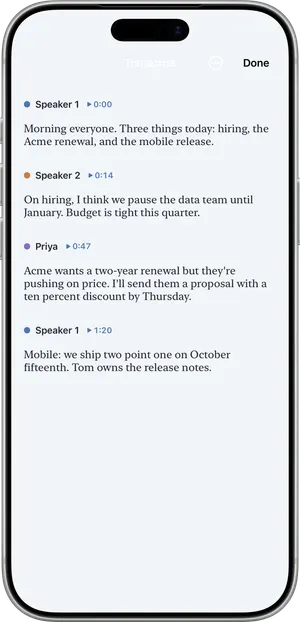
- A transcript split by speaker, with voices you can name.
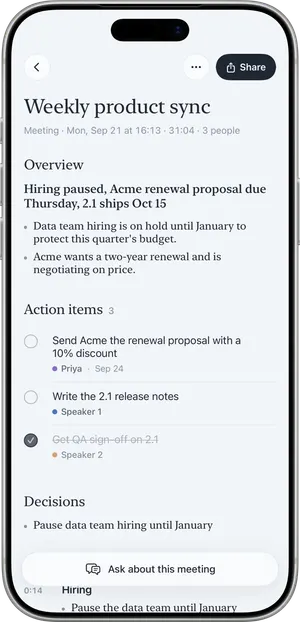
- A summary: overview, key points and decisions, written in the language that was spoken.
- Action items with owners and due dates when they were said, which land in your To-dos list.
- Ask. Ask what was agreed about a subject and get an answer that cites the note.
- Sharing. Share the summary as text, or export a PDF with Pro.
A coaching session, step by step
Picture an hour-long coaching session in a meeting room, with a client who is preparing for a new management role.
- Before the first session you explain that you would like to record for your own notes, how the audio is handled and that the client can say no at any time. The client agrees.
- You set the microphone mode to Room, tap Record and lock the phone. Recording continues with the screen locked.
- After fifty minutes you tap End. Nuvi shows Recorded, Uploaded, Transcribed, Writing summary.
- Nuvi asks “Which one is you?” and you pick your voice. You decide whether to use Save and remember voice for the client. A remembered voice stays on your device, is not synced to iCloud and is excluded from backups.
- You read the summary. A name is misheard, so you use Fix a word… once.
- You open To-dos: “Send reading list” is there for this week.
- Before the next session you use Ask on the note: “What did we agree she would try before we meet again?”
How audio is handled
This is the whole of what Nuvi claims. Nothing here is a certification.
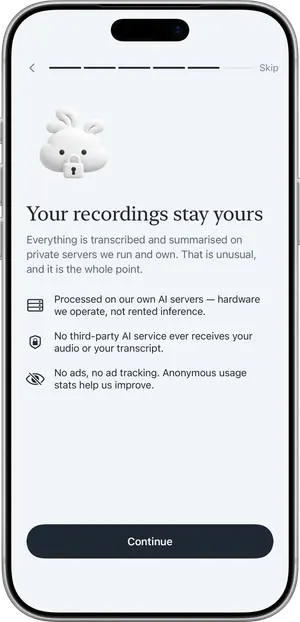
- Audio is uploaded over an encrypted connection (TLS) to temporary cloud storage (Google Cloud Storage, EU region) only so it can be transcribed.
- From there it goes to speech and language models that run on servers the developer operates. It is not sent to a third-party AI service.
- The uploaded audio is deleted as soon as the transcript has been returned. A storage rule deletes any leftover upload after one day.
- Transcripts and summaries are produced on the server and returned. They are not stored on the server.
- Notes live on your device and, if you use iCloud, in your own private iCloud, which the developer cannot read.
- Audio and transcripts are not used to train AI models.
- “Delete all data” in Settings removes everything: on the device, in iCloud and on the servers.
More detail is on how Nuvi handles your audio and in the privacy policy.
What it does not do, and when it is the wrong tool
- No compliance claims. Nuvi is not certified under HIPAA, GDPR, SOC 2, ISO or any other scheme, and it gives no assurance about legal privilege or professional confidentiality rules.
- No transcription on the device. Audio leaves the device to be transcribed. If your rules require on-premises or on-device processing, Nuvi is not the right tool today.
- If you need a signed vendor agreement. If your rules require a signed agreement with the vendor, for example a business associate agreement, Nuvi is not the right tool today.
- Not an official record. AI output can be wrong, incomplete or attribute words to the wrong speaker. It is not a legal, clinical or medical record.
- No shared workspace and no integrations.
- No phone or video calls. It does not record phone calls or join Zoom, Google Meet or Microsoft Teams.
If you are a lawyer, clinician, financial adviser or other regulated professional, check your own professional rules and your employer’s policy before recording anything. In some regulated settings the honest answer will be that Nuvi does not fit.
Consent
Recording other people may require their consent depending on where you are. Tell the client before you record, every session, and do not record if they decline. Your professional rules may ask for more than the law does, such as written consent. See Is it legal to record a meeting?; it is general information, not legal advice.
What it costs
The free plan transcribes the first 10 minutes of each recording, up to 30 minutes a month. A full session needs Nuvi Pro: up to 60 minutes per recording, no monthly limit (fair use), plus PDF export. US prices are $4.99 a week, $14.99 a month or $49.99 a year, with a free trial where available. See pricing.
Related pages
Recording other people may require their consent depending on where you are. Tell people before you record.
Questions
Is Nuvi HIPAA compliant?
Nuvi makes no compliance or certification claims of any kind, including HIPAA, GDPR compliance, SOC 2 or ISO. It is built by an individual developer. If your rules require a signed agreement with the vendor, such as a business associate agreement, or a certified service, Nuvi is not the right tool today.
Where does the audio of a client conversation go?
Audio is uploaded over an encrypted connection (TLS) to temporary cloud storage (Google Cloud Storage, EU region) only so it can be transcribed. It goes to speech and language models on servers the developer operates, not to a third-party AI service. The upload is deleted as soon as the transcript has been returned, and a storage rule deletes any leftover upload after one day.
Are transcripts stored on Nuvi's servers?
No. Transcripts and summaries are produced on the server and returned; they are not stored on the server. Notes live on your device and, if you use iCloud, in your own private iCloud, which the developer cannot read. Delete all data in Settings removes everything on the device, in iCloud and on the servers.
Can I use a Nuvi summary as the official record of a session?
No. Transcripts and summaries are AI output. They can be wrong, incomplete or attribute words to the wrong speaker. Treat them as your own working notes, check anything important against the recording, and keep whatever official, legal or medical record your profession requires in the way your rules prescribe.
Do I need my client's consent to record?
Ask every time. Recording other people may require their consent depending on where you are, and your profession or contract may set a stricter rule than the law does. Explain what the recording is for and where the audio goes, and do not record if the client says no. This is general information, not legal advice.
Tap Record. Read it later.
The transcript, the summary and the to-dos are part of the free plan.
