 Nuvi
NuviLeave the customer visit with the follow-ups written down
Record an in-person customer conversation with consent and get a summary, the decisions and the action items, with owners and due dates when they were said.
Nuvi, the AI note taker for iPhone, iPad and Apple Watch by Ege Beşe, records a customer conversation that happens face to face and returns a transcript split by speaker, a summary and the follow-ups. It does not join video calls and it does not write to a CRM, so read the limits below before you plan around it.
The problem with notes from a customer visit
On a site visit you are walking, looking and listening at once. The customer mentions the budget cycle next to the loading dock and the name of the person who signs off while you are both on the stairs. Writing any of it down means looking away at the wrong moment.
So the notes get written afterwards, in the car, from memory. By then the three things you promised have become two, and the date the customer gave for their decision is “sometime next month”. The follow-up email goes out vague, and the record of the visit is whatever you managed to recall.
What Nuvi gives you after the conversation
- A transcript split by speaker, with voices you can name.
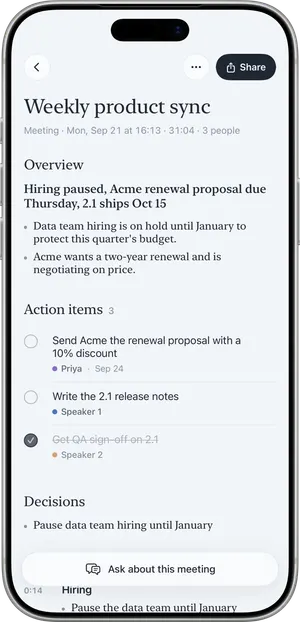
- A summary: an overview, key points and decisions, in the language that was spoken.
- Action items with owners and due dates when they were said. “I’ll send the revised quote by Thursday” becomes an item with you as the owner and Thursday as the date.
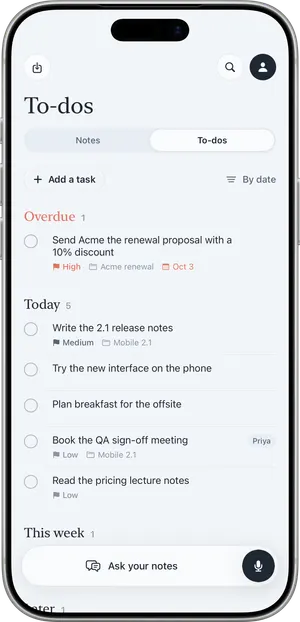
- To-dos. Your follow-ups land in a list sorted into Overdue, Today, This week and Later.
- Ask. Ask what the customer said about delivery times and get an answer that cites the note. With Pro, ask across every conversation you have recorded.
- Sharing. Share the summary as text, or as a PDF with Pro.
A site visit, step by step
Picture a visit to a small warehouse to discuss new shelving, with the operations manager and one of her colleagues.
- At the start you say you would like to record so you get the details right, and both agree.
- You add the customer’s product names to custom vocabulary beforehand, so they are more likely to be heard correctly.
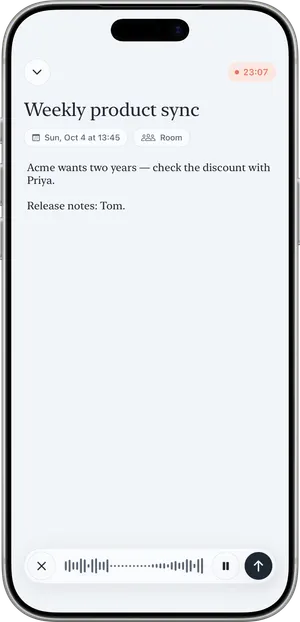
- You set the microphone mode to Room, tap Record and lock the screen. Recording continues, and a Live Activity shows it is running. If you would rather keep the phone in a pocket, you can record on Apple Watch.
- Part of the warehouse has no signal. That is fine: recording works without a connection.
- Back at the office door you tap End. Nuvi shows Recorded, Uploaded, Transcribed, Writing summary. If you are still offline it shows “Waiting for connection” and sends the audio later.
- Nuvi asks “Which one is you?” You pick your voice, name the operations manager and choose Save and remember voice for the next visit.
- You read the summary. It lists the decision to measure two aisles first, and three action items. Two have an owner and a due date, because those were said.
- A product code is misheard. You use Fix a word… once; every place in the note is corrected.
- You open To-dos and see your follow-ups under This week. You share the summary as text and paste it into your own customer record.
What it does not do
- It does not join Zoom, Google Meet or Microsoft Teams calls. There is no meeting bot.
- It does not record phone calls.
- It has no CRM integration, and no Slack or Notion integration. Nothing is pushed anywhere. You share the summary as text, or as a PDF with Pro, and file it yourself.
- It has no team workspace. A manager cannot see a rep’s notes, and there are no shared folders.
- One hour per recording. A long visit means a second recording.
- It can be wrong. Transcripts are AI output and may mishear a figure, a name or who said what. Check prices, quantities and dates against the recording before they go into a quote.
If your work is mostly video calls with a pipeline in a CRM, a tool built for that will serve you better; the comparison pages say where.
Tell the customer before you record
Recording other people may require their consent depending on where you are, and a customer site may have its own rules about recording on the premises. Ask before you tap Record, and do not record if anyone objects. See Is it legal to record a meeting? for the general picture; it is not legal advice.
What it costs for customer conversations
The free plan transcribes the first 10 minutes of each recording, up to 30 minutes a month. That covers a short booth conversation, not a site visit. Nuvi Pro transcribes up to 60 minutes per recording with no monthly limit (fair use), and adds PDF export, sharing without the “Made with Nuvi” line and Ask across all notes. US prices are $4.99 a week, $14.99 a month or $49.99 a year, with a free trial where available. See pricing.
Related pages
- Meeting minutes, notes and action items: the difference
- Nuvi vs Fireflies, for teams that live in video calls
- Client consultations
- How Nuvi handles your audio
Recording other people may require their consent depending on where you are. Tell people before you record.
Questions
Does Nuvi work for in-person sales meetings?
Yes. Nuvi records the conversation through the iPhone, iPad or Apple Watch and returns a transcript split by speaker and a summary with key points, decisions and action items. It suits site visits, discovery conversations across a table and trade-show conversations. Tell the customer before you record.
Does Nuvi sync notes to a CRM?
No. Nuvi has no CRM integration and no Slack or Notion integration. You can share the summary as text for free, which adds a Made with Nuvi line, or export it as a PDF with Nuvi Pro, and paste or attach it to the customer record yourself.
Can Nuvi record sales calls on Zoom or on the phone?
No. Nuvi does not join Zoom, Google Meet or Microsoft Teams calls and does not record phone calls. It records the sound around the device. If most of your selling happens on video calls, a tool built to join those calls and update a CRM is a better fit.
Does it capture who owns each follow-up?
Action items include an owner and a due date when those were said in the conversation. If someone says they will send the revised quote by Thursday, the item can carry that person and that date. If nobody named an owner or a date, Nuvi leaves them out. Check the list before you act on it.
Will it work on a noisy trade-show floor?
Expect more mistakes in noise. The Room microphone mode hears every voice around the phone, including the booth next door. The Just me mode reduces background noise and cleans up the closest voice, but the other person may come out faint. Transcripts are AI output and can be wrong, so read the summary soon after.
Tap Record. Read it later.
The transcript, the summary and the to-dos are part of the free plan.
