 Nuvi
NuviOne place for what was said and what you promised
Record co-founder syncs, customer interviews and your own thinking out loud. Nuvi keeps the decisions and the follow-ups, on your device and your own iCloud.
Nuvi, the AI note taker for iPhone, iPad and Apple Watch by Ege Beşe, is a personal tool. It records the conversations you have in person and the thoughts you say out loud, and gives back transcripts, summaries and a to-do list. There is no account and no team workspace, which suits someone working alone or with one or two others.
The problem when you are the whole company
In one day you might talk to a customer, an investor and your co-founder, and then think through pricing on the walk home. Each conversation produces promises: an introduction to make, a number to send, a feature to look into. Nobody else is taking notes, because there is nobody else.
By Friday the promises are scattered across your memory, a paper notebook and three chat threads. The customer’s exact words about why they would pay, which you wanted for the landing page, are gone. So is the reason you and your co-founder settled on the smaller launch.
What Nuvi gives you
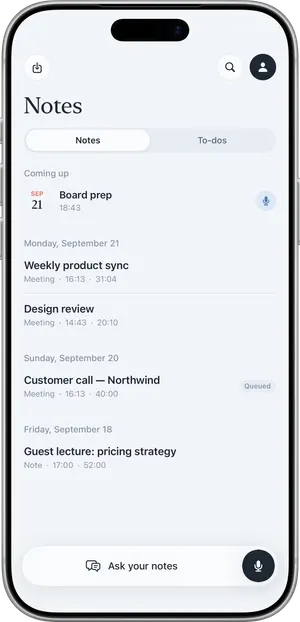
- Meetings and Notes. Several voices make a Meeting, with the transcript split by speaker. One voice makes a Note.
- A summary of each one: overview, key points and decisions, in the language that was spoken.
- Action items with owners and due dates when they were said, collected in one to-do list sorted into Overdue, Today, This week and Later.
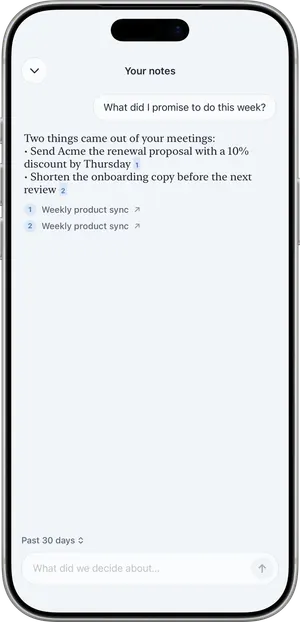
- Ask. Ask a question about one note, or with Pro across all of them. “What reasons have customers given for not switching?” comes back with the notes it drew from.
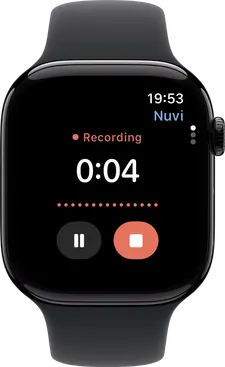
- Recording from the wrist. Apple Watch records and hands the file to the iPhone.
- Notes that stay yours. They live on your device and, if you use iCloud, in your own private iCloud, which the developer cannot read.
A founder’s Tuesday, step by step
Picture someone building a booking tool for independent gyms, with one co-founder.
- At ten she meets a gym owner at his front desk. She asks if she may record for her notes, and he agrees.
- She sets the microphone mode to Room, taps Record and locks the phone. Recording continues with the screen locked.
- After forty minutes she taps End. Nuvi shows Recorded, Uploaded, Transcribed, Writing summary.
- Nuvi asks “Which one is you?” She picks her voice and names the gym owner.
- The summary lists what he uses today and one action item: she said she would send a demo link by Thursday. It is in To-dos with that date.
- The name of his current software is misheard. She uses Fix a word… once, and it is corrected across the note and in later recordings.
- In the afternoon she and her co-founder talk through the launch at a café. She records it, and chooses Save and remember voice for him so later syncs are labelled.
- Walking home she taps Record on her watch and talks through pricing for five minutes. The watch hands the file to her iPhone, and it becomes a Note.
- On Friday she uses Ask across all notes: “What did gym owners say about cancellations?” The answer cites the notes it came from.
What it does not do
- No team workspace. No shared folders, no comments, no roles. You share a summary as text or, with Pro, as a PDF.
- No integrations. Nothing is sent to a CRM, Slack or Notion, and Nuvi never creates or changes calendar events.
- No video calls and no phone calls. It does not join Zoom, Google Meet or Microsoft Teams.
- No Mac, Windows, Android or web app. iPhone, iPad and Apple Watch only.
- No on-device transcription. Recording works offline; the transcript needs a connection.
- One hour per recording.
- It can be wrong. Transcripts and summaries are AI output. Check a figure or a commitment against the recording before you put it in an investor update.
Ask before you record
Recording other people may require their consent depending on where you are. Tell people before you record, including investors and customers, and accept a no. An investor conversation can still be captured afterwards as a voice memo in your own words. See Is it legal to record a meeting?; it is general information, not legal advice.
What it costs for one person
The free plan transcribes the first 10 minutes of each recording, up to 30 minutes a month, with summaries, to-dos and Apple Watch recording included. That covers walking thoughts. Customer interviews and Ask across all notes need Nuvi Pro: up to 60 minutes per recording, no monthly limit (fair use), calendar capture and PDF export. US prices are $4.99 a week, $14.99 a month or $49.99 a year, with a free trial where available. There is no per-seat pricing because there are no seats. See pricing.
Related pages
Recording other people may require their consent depending on where you are. Tell people before you record.
Questions
Do I need an account to use Nuvi?
No. Nuvi asks for no account and no email. The app signs in anonymously in the background with a random identifier. Your notes live on your device and, if you use iCloud, in your own private iCloud, which the developer cannot read.
Can I share notes with my co-founder or team?
Only by sending them. Nuvi has no team workspace and no shared folders. You can share a summary as text for free, which adds a Made with Nuvi line, or export a PDF with Nuvi Pro. If you need notes that a whole team edits and searches together, Nuvi is not built for that.
Can I search across all my conversations?
With Nuvi Pro, yes. Ask lets you put a question to all your notes at once, and the answer cites the note it came from. On the free plan you can ask about one note at a time. Answers are AI output, so open the cited note before you rely on a detail.
Will Nuvi record my investor call on Zoom?
No. Nuvi does not join Zoom, Google Meet or Microsoft Teams calls and does not record phone calls. It records conversations that happen in person, through the iPhone, iPad or Apple Watch. For video calls you need a different tool; the comparison pages on this site describe several.
Is my audio used to train AI models?
No. Audio and transcripts are not used to train AI models. Audio is uploaded over an encrypted connection (TLS) to be transcribed by models on servers the developer operates, and the upload is deleted as soon as the transcript has been returned. It is not sent to a third-party AI service.
Tap Record. Read it later.
The transcript, the summary and the to-dos are part of the free plan.
